
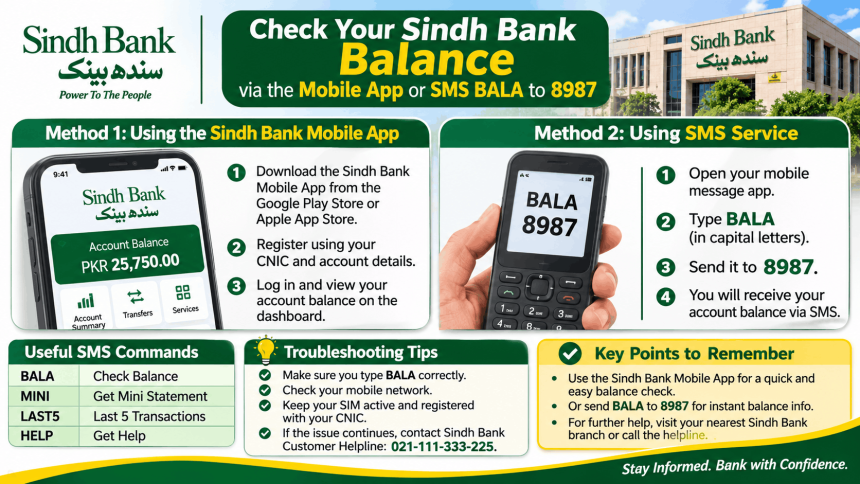
You can check your Sindh Bank online balance in two official ways: through the Sindh Bank Mobile App or by sending an SMS to 8987. The app shows your balance instantly after a secure login, while the SMS method works on any phone without internet . There is no separate web portal for balance checks, so you do not need to visit a branch or use a third-party website. This guide explains both methods, the exact SMS command, and the common mistakes to avoid.
Method 1: Sindh Bank Mobile App
The app is the most detailed option. It shows your balance, transaction history, and account statement in one place .
What You Need Before You Start
-
Your Sindh Bank account number.
-
Your CNIC and registered mobile number.
-
A stable internet connection (Wi-Fi or mobile data).
Step-by-Step
-
Download the app: Search for “Sindh Bank Limited” on Google Play or the App Store. The developer name is Avanza .
-
Register: Open the app and tap Self-registration. Enter your account number, CNIC, and the mobile number registered with the bank. You will receive an OTP to verify .
-
Log in: After registration, log in using your username and password, or enable fingerprint login for faster access .
-
Check balance: Once logged in, the home screen or Account Inquiry section displays your available balance. You can also tap Transaction History to see recent debits and credits .
If you face any issue with registration or login, call Sindh Bank customer support on 021 111 11 7623 .
Method 2: SMS Banking (No Internet Needed)
This is the simplest method if you do not have the app. It works on any mobile phone.
The Command
Send an SMS with the word BALA to 8987 .
Step-by-Step
-
Open your phone’s SMS app.
-
Type BALA in the message body.
-
Send it to 8987.
-
You will receive a reply with your account balance.
Important: This service requires that your mobile number is registered with Sindh Bank for SMS alerts. If you have recently changed your number, visit a branch to update it, or the SMS may not reach you.
Other Useful SMS Commands
Sindh Bank offers a few other commands on the same short code :
-
HELP: To get a list of all SMS commands.
-
LFTR: For your last 10 transactions.
-
LFTR <Account-no>: If you have more than one account.
What to Do If the Check Fails
| Problem | Likely Cause | What to Do |
|---|---|---|
| SMS gets no reply | Mobile number not registered for SMS banking | Visit your branch to register or update your number |
| App login fails | Wrong password or unregistered device | Use “Forgot Password” in the app, or call 021 111 11 7623 |
| App shows an old balance | Pending transactions not yet posted | Check Transaction History for recent activity. Bank systems can take a short time to update |
Scam Warning: Stay Safe
Sindh Bank will never ask for your password, OTP, or PIN through a phone call, SMS, or WhatsApp message. Be careful of websites or apps that look like Sindh Bank but are not on the official Google Play or App Store links. Always download the app from the official store, and never share your login details with anyone.
Frequently Asked Questions
What is the Sindh Bank balance check number?
The SMS banking short code is 8987. Send the word BALA to this number to receive your balance .
Can I check my Sindh Bank balance without the app?
Yes. Use the SMS method. Send BALA to 8987 from your registered mobile number. It works without internet .
Is there a Sindh Bank online portal for balance checks?
The available sources do not list a separate web portal for Sindh Bank balance checks. The official methods are the mobile app and SMS banking.
How do I register for Sindh Bank mobile banking?
Download the Sindh Bank Limited app from Google Play or the App Store and tap Self-registration. You need your account number, CNIC, and registered mobile number .
What is Sindh Bank customer support number?
Call 021 111 11 7623 for assistance with the app or your account .