
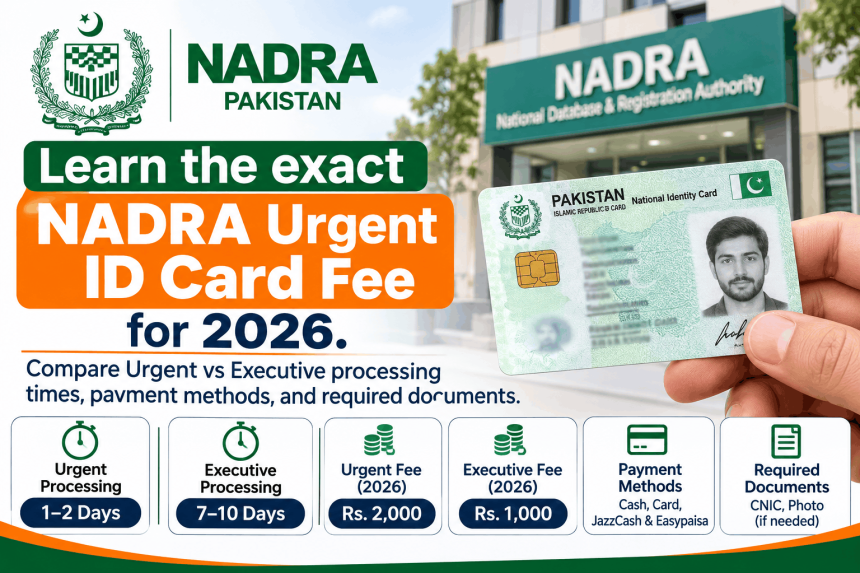
The NADRA urgent ID card fee for a Smart NIC is Rs 1,500, and the processing time is 23 days . If you need it faster, the Executive category costs Rs 2,500 and delivers in 9 days . These are the official rates for the Smart NIC, which is the card most people now apply for through the PakID app. The fees are fixed, but the timelines only start after your payment is confirmed, not when you submit the form . This guide explains the fee structure, the difference between Urgent and Executive, and the steps to apply without delays.
The Official NADRA Urgent Fee Structure (2026)
NADRA offers three processing categories: Normal, Urgent, and Executive. The fees and timelines differ depending on the type of card.
| Card Type | Normal | Urgent | Executive |
|---|---|---|---|
| Smart NIC (New/Renew/Modify/Duplicate) | Rs 750 (31 days) | Rs 1,500 (23 days) | Rs 2,500 (9 days) |
| Standard CNIC (New) | Free (15 days) | Rs 1,150 (12 days) | Rs 2,150 (6 days) |
| Standard CNIC (Renew/Modify/Duplicate) | Rs 400 (15 days) | Rs 1,150 (12 days) | Rs 2,150 (6 days) |
Important: If you are applying for your first-ever CNIC (age 18+), the Normal category is free. But if you choose Urgent, you pay the urgent fee (Rs 1,150 for standard, or Rs 1,500 for Smart) .
Urgent vs Executive: What the Difference Actually Means
The names are slightly misleading. Both are “fast” options, but Executive is the fastest.
Urgent (Rs 1,500, 23 days): This is the middle tier. It is faster than Normal (31 days for Smart NIC) but slower than Executive. For many people, 23 days is still too long if they need the card for a visa or a job.
Executive (Rs 2,500, 9 days): This is the fastest option. If you need the card urgently, Executive is the only category that delivers in under two weeks. The extra Rs 1,000 over Urgent buys you 14 fewer days .
A practical note: The 23-day and 9-day timelines are estimates, not guarantees. NADRA states that processing time begins after fee payment is confirmed . If there is a delay in payment verification, or if your documents need manual review, the actual time can be longer.
How to Pay the Urgent Fee
You cannot pay cash at a NADRA office for an online application. The payment methods depend on how you apply.
If Applying Through the PakID App
The PakID app accepts several payment methods :
-
Debit/Credit Card (Visa or Mastercard)
-
Raast (generate a QR code in the app and scan it with your banking app)
-
Easypaisa (Smart NIC and FRC only)
-
JazzCash (Smart NIC and FRC only)
-
e-Sahulat Franchise (Smart NIC and FRC only)
Important: The app will generate a Tracking ID. You need this ID to pay. Do not lose it.
If Applying at a NADRA Registration Centre (NRC)
You can pay at the counter. Ask for a receipt. The receipt will show your Tracking ID and the amount paid.
Documents You Need for an Urgent Application
The documents are the same regardless of whether you choose Normal, Urgent, or Executive. The fee does not change the requirements.
For a Smart NIC (new, renewal, modification, or duplicate), you generally need:
-
Your original CNIC (for renewal or modification) or your B-Form (for a first-time application).
-
A passport-sized photograph (the app may also take a live photo).
-
Proof of any change you are requesting (e.g., marriage certificate for a name change, matric certificate for a date of birth correction).
-
Your fingerprints for biometric verification (done at the NRC or through the app’s live scan).
For a first-time CNIC, the birth certificate requirement has been waived until 31 December 2026 . However, you still need to prove your identity and your parents’ details.
Step-by-Step: Applying for an Urgent Smart NIC
The most common route is the PakID app. Here is how it works.
Step 1: Download the PakID App. Only use the official links from nadra.gov.pk. The app is called Pak Identity on Google Play and the App Store.
Step 2: Create an Account. Register with your CNIC, mobile number, and email. You will receive an OTP to verify.
Step 3: Select the Service. Choose the service you need (New Smart NIC, Renewal, Modification, or Duplicate).
Step 4: Fill the Form. Enter your details. Upload the required documents. For a modification, make sure the supporting documents clearly show the change you are requesting.
Step 5: Choose the Category. Select Urgent (Rs 1,500) or Executive (Rs 2,500). The app will show the fee.
Step 6: Pay the Fee. Use one of the methods listed above. Once payment is confirmed, your processing time begins.
Step 7: Track Your Application. Use the Tracking ID in the PakID app to check the status. The app shows a chronological list of milestones.
Step 8: Collect the Card. When the status shows “Ready for Delivery” or “Printed,” you can collect it from the designated NRC or wait for courier delivery (if you paid the Rs 165 delivery charge ).
Common Problems and What to Do
The fee is higher than you expected. Check which card type you selected. The Smart NIC is more expensive than the Standard CNIC. If you are renewing an old CNIC, you may be eligible for the Standard CNIC fee (Rs 400 Normal, Rs 1,150 Urgent, Rs 2,150 Executive) if you do not want the chip-based Smart card .
The app will not accept your payment. Try a different method. If Raast is failing, try a debit card. If Easypaisa is not working, try JazzCash. If all fail, visit an e-Sahulat franchise (for Smart NIC only) .
The processing time is longer than 23 days. Call the NADRA helpline at 1777. Have your Tracking ID ready. The delay could be due to a document issue, a biometric mismatch, or a backlog. The helpline can tell you what is holding it up.
You need the card faster than 9 days. NADRA does not offer a faster option than Executive. If you need it urgently for travel, visit a NADRA Registration Centre in person and explain your situation. In some cases, they can expedite the process, but this is not guaranteed.
Frequently Asked Questions
What is the NADRA urgent ID card fee for 2026?
For a Smart NIC, the Urgent fee is Rs 1,500. For a Standard CNIC, the Urgent fee is Rs 1,150. The Smart NIC is the chip-based card, while the Standard CNIC is the older paper or card version .
How long does NADRA urgent processing take?
The Smart NIC Urgent category takes 23 days. The Standard CNIC Urgent category takes 12 days. The Executive category is faster: 9 days for Smart NIC and 6 days for Standard CNIC .
Can I pay the urgent fee in cash?
If you apply online through the PakID app, you must pay digitally (card, Raast, Easypaisa, or JazzCash). If you apply at a NADRA centre, you can pay at the counter. Do not pay any agent outside the official system .
What is the difference between Urgent and Executive?
Executive is faster. Urgent takes 23 days (Smart NIC) or 12 days (Standard). Executive takes 9 days (Smart NIC) or 6 days (Standard). The fee difference is Rs 1,000 for Smart NIC (Rs 1,500 vs Rs 2,500) .
Is the first CNIC free even if I choose Urgent?
No. The first CNIC is free only under the Normal category. If you choose Urgent or Executive, you pay the applicable fee. For a first Smart NIC, Urgent is Rs 1,500. For a first Standard CNIC, Urgent is Rs 1,150 .