
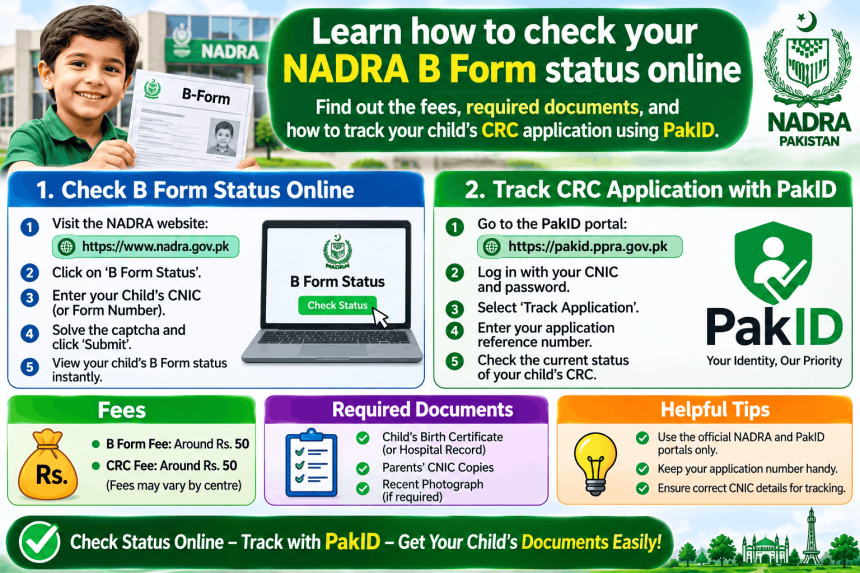
There is no separate website for a NADRA B Form check online. The B Form, officially called the Child Registration Certificate (CRC), is tracked through the same system as CNIC and NICOP applications. To check the status of your child’s B Form, you must use the PakID mobile app and enter your Tracking ID and PIN . This guide explains where to find those details, how to track the application, the current fees, and the common mistakes that delay the process.
What Is a NADRA B Form?
The B Form is the first identity document for a Pakistani child under 18. It records the child’s name, date of birth, and parents’ details. It is required for school admission, passport applications, and other government services .
The B Form is issued by NADRA, but the process starts at your local Union Council. You must first register the child’s birth and get a birth certificate. Only then can you apply for the B Form .
What You Need Before You Start
Keep these documents ready. You will need them for the application, and you will need your Tracking ID and PIN to check the status.
-
Child’s Union Council birth certificate: This is mandatory before applying for the B Form .
-
Both parents’ original CNICs: You will need clear copies for the application .
-
Child’s photograph: Required if the child is above three years of age .
-
Your Tracking ID and PIN: These are printed on the receipt you receive after submitting the application at a NADRA centre, or listed in the PakID app if you applied online .
How to Check Your B Form Status Online
The official method is the PakID app. Do not use unofficial websites that claim to check NADRA records.
Step 1: Download the PakID App
Install the app only from the official store links on nadra.gov.pk. The app is called Pak Identity on Google Play and the App Store .
Step 2: Log In and Find Tracking
Open the app and log in. On the home screen, tap Tracking. If you cannot see it, use the search bar .
Step 3: Enter Tracking ID and PIN
Enter the Tracking ID and PIN from your application receipt. Tap Get Details. The app will show the current status and a chronological list of milestones with dates .
Step 4: Read the Status
The app shows whether the application is submitted, in process, printed, or ready for collection. If there is a problem, tap the tracking ID to see the reason .
Alternative Ways to Check Status
If you cannot use the app, these are the official backup methods.
SMS to 8400. Send only your Tracking ID to 8400. You will receive a reply with the status. This is a backup method reported by NADRA in September 2026. The SMS charge depends on your network .
Call 1777. Call the NADRA helpline on 1777 from your mobile. Keep your Tracking ID and CNIC number ready. The helpline can confirm the status and tell you if any documents are missing .
B Form Fees and Processing Time
The fees are fixed by NADRA. Nobody can charge you more.
| Service | Fee | Processing Time |
|---|---|---|
| Normal | Rs 50 | 7 days |
| Executive | Rs 500 | 1 day |
Source: NADRA fee page via GoPunjab .
The processing time starts after you pay the fee. If your documents are incomplete or incorrect, the application will be delayed .
Common Reasons for Delay
Most delays happen for a few predictable reasons.
The Union Council birth certificate is missing. You cannot get a B Form without it. If you have not registered the birth, do that first .
The child’s photo is missing. For children over three, a recent photograph is required. Without it, the application is incomplete .
The parents’ CNIC details do not match. If the parents’ records in NADRA are outdated, the B Form application can be rejected. Make sure the parents’ CNICs are valid and the family data is correct.
You applied at a NADRA centre but lost the receipt. The Tracking ID and PIN are on the receipt. If you lose it, check the PakID app inbox if you have an account, or call 1777 for help .
Provincial Differences
The B Form is a federal document, but the birth registration process before it differs by province.
Punjab: Births should be registered within one year. Late registration up to seven years requires Form A and additional documents. After seven years, more proof and a public notice are needed .
Sindh and Punjab: Parents can apply for the B Form online through the PakID app. The birth notification SMS from the hospital helps with Union Council registration .
Khyber Pakhtunkhwa: The PakID app facility is pending approval. Check with your local NADRA office for the current process .
Balochistan: The online facility is being expanded gradually. The Union Council birth certificate is still required first .
Frequently Asked Questions
How do I check my NADRA B Form online?
Use the PakID app. Log in, tap Tracking, and enter your Tracking ID and PIN. The app shows the current status and all completed steps .
What is the fee for a NADRA B Form?
The fee is Rs 50 for normal processing (7 days) and Rs 500 for executive processing (1 day). There is no urgent category for the B Form .
Can I apply for a B Form without a Union Council birth certificate?
No. The Union Council birth certificate is mandatory before NADRA can issue the B Form. You must register the birth first .
What is the SMS number to check NADRA application status?
Send your Tracking ID to 8400. This is an official NADRA backup method. The app is the primary method .
Can I check my B Form status by CNIC?
No. You need the Tracking ID and PIN from your application. The CNIC alone is not enough to track a B Form application .