
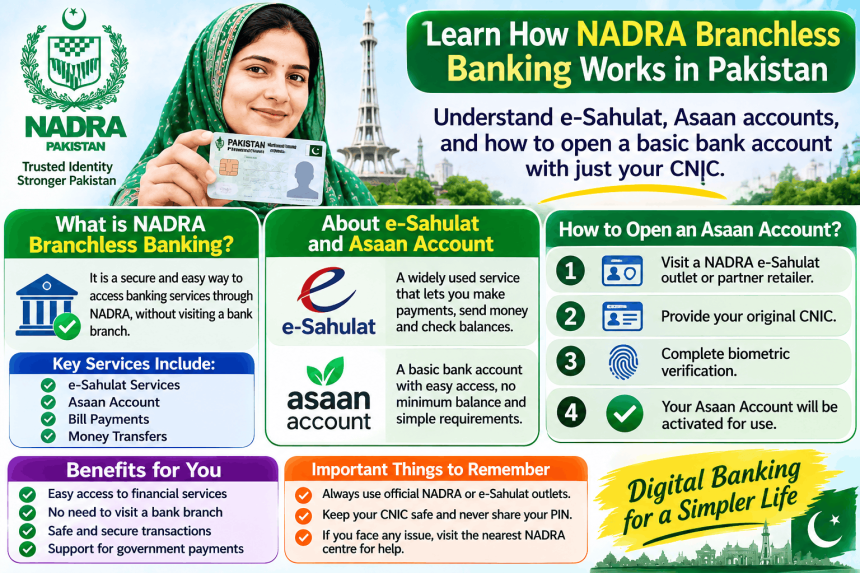
NADRA branchless banking is not a single service you apply for at a NADRA office. Instead, it refers to the system where NADRA’s e-Sahulat franchise network acts as a bridge between banks and people who do not have regular bank accounts . Through this system, you can open a simple bank account, send or receive money, and pay bills at a nearby shop instead of visiting a bank branch. This guide explains how the system works, what you need to open an account, and the practical steps to get started.
What is NADRA’s Role in Branchless Banking?
NADRA itself is not a bank. Its role is to provide the technology and the physical network.
NADRA Technologies Limited (NTL) designed the automated system that allows banks and telecom companies to offer financial services through e-Sahulat touchpoints . When you visit an e-Sahulat franchise for a banking transaction, the system verifies your identity using NADRA’s database.
The e-Sahulat network started in 2008 for utility bill payments. By 2010, it was processing an average of seven million transactions monthly . Today, NADRA has released data for over 3,000 e-Sahulat franchises across Pakistan, making it easier for people to find a nearby location .
What Can You Do at an e-Sahulat Franchise?
E-Sahulat centres are not just for banking. They offer several identity and financial services in one place.
-
Open a basic bank account: You can open an Asaan Account (a simplified bank account) at a participating bank branch, but e-Sahulat agents may facilitate transactions for these accounts.
-
Cash in and cash out: Deposit or withdraw money from your branchless banking account.
-
Send and receive money: Use domestic remittance services through partner banks like HBL and Bank Alfalah .
-
Pay bills: Utility bills, mobile top-ups, and other payments.
-
NADRA identity services: Renew your CNIC, get a duplicate card, or make a B-Form for children under 10 .
How to Open an Asaan Account (The Basic Bank Account)
The easiest way to start with branchless banking is to open an Asaan Account. This is a special account designed for people with limited proof of income.
Eligibility
You must be a resident Pakistani national with a valid CNIC, SNIC, or NICOP . You should not already have another account in the same bank if you are opening an Asaan Account there.
What You Need
-
Your original CNIC (Computerised National Identity Card).
-
A mobile phone number registered in your name.
-
A self-declaration of your source of income (for Asaan Accounts) .
-
A minimum deposit of Rs. 100 to open the account .
Where to Open It
You must visit a bank branch in person to open an Asaan Account. You cannot open it entirely online. Banks like Meezan Bank, Askari Bank, and others offer this product . The staff will help you fill the form and complete the process.
Understanding the Limits
Asaan Accounts have limits set by the State Bank of Pakistan. This is to keep the account simple and low-risk.
| Feature | Limit |
|---|---|
| Maximum credit balance | PKR 3,000,000 |
| Monthly debit limit | PKR 1,000,000 |
| Minimum opening deposit | Rs. 100 |
| Commercial remittance | Not allowed |
These limits mean the account is for personal, everyday use. If you need to do large business transactions, you will need a regular account.
The Asaan Mobile Account (AMA): Opening by Phone
There is an even simpler option called the Asaan Mobile Account (AMA). This is a Level 0 branchless banking account that you can open using your mobile phone without internet.
How to Open AMA
-
Insert your CNIC-registered SIM into your phone.
-
Dial *2262# from your mobile .
-
Follow the menu instructions to open your account.
-
You will need to complete biometric verification within 60 days at any branchless banking agent of your bank .
If you do not do the biometric verification within 60 days, your account will be debit-blocked . AMA is useful for people who need a quick account for basic transactions, but it has lower limits than a full Asaan Account.
Realistic Obstacles and How to Handle Them
Your SIM is not in your name. If your mobile SIM is registered under someone else’s CNIC, you cannot open an AMA or use mobile banking easily. Visit a telecom franchise to transfer the SIM to your name first.
You do not have proof of income. This is exactly why Asaan Accounts exist. The self-declaration form replaces the need for salary slips or business documents.
You cannot find an e-Sahulat centre. NADRA has released a list of over 3,000 franchise locations . Ask at a local bank branch or check NADRA’s official website for the nearest location.
Biometric verification fails. Sometimes fingerprints do not match due to wear or injury. You will need to visit a NADRA office to update your biometrics before you can complete the verification.
Frequently Asked Questions
Do I need a bank account to use e-Sahulat?
No. E-Sahulat is a franchise platform. You can use it to pay bills or renew your CNIC without having a bank account. For banking services, you need an account with a participating bank.
Can I open a bank account at an e-Sahulat shop?
No. You cannot open a full bank account at an e-Sahulat shop. You must visit a bank branch to open an Asaan Account. E-Sahulat agents help with transactions for accounts you already have.
What is the difference between Asaan Account and AMA?
An Asaan Account is opened at a bank branch with a Rs. 100 deposit and has higher limits (up to PKR 3,000,000 balance). An AMA is opened by dialing *2262# and has lower limits (PKR 200,000 balance for Level 0) and requires biometric verification within 60 days .
What documents do I need for an Asaan Account?
You need your valid CNIC, a mobile number in your name, and a self-declaration of income. You also need Rs. 100 for the initial deposit .
Is NADRA branchless banking safe?
Yes, when you use official channels. The system uses biometric verification against NADRA’s database to confirm identity . Never share your PIN or OTP with anyone, even if they claim to be from the bank.